



IO-Link Gateway Manager
Today, IO-Link masters communicate with exactly one controller. Anyone wishing to connect an additional engineering tool, monitoring system, or cloud service must either route through the PLC or forgo the connection. TEConcept’s IO-Link Gateway Manager fully implements the IO-Link Community’s new ‘Gateway Management’ draft. Multiple clients can then work simultaneously with the same masters, and for each, it is defined what they are permitted to read and write. Two videos demonstrate how this works and how to set it up in the configurator.
Products & Services · 8 min read · 2 videos · 36 min · German, subtitles DE/EN
One master, one controller: where the current limitations lie
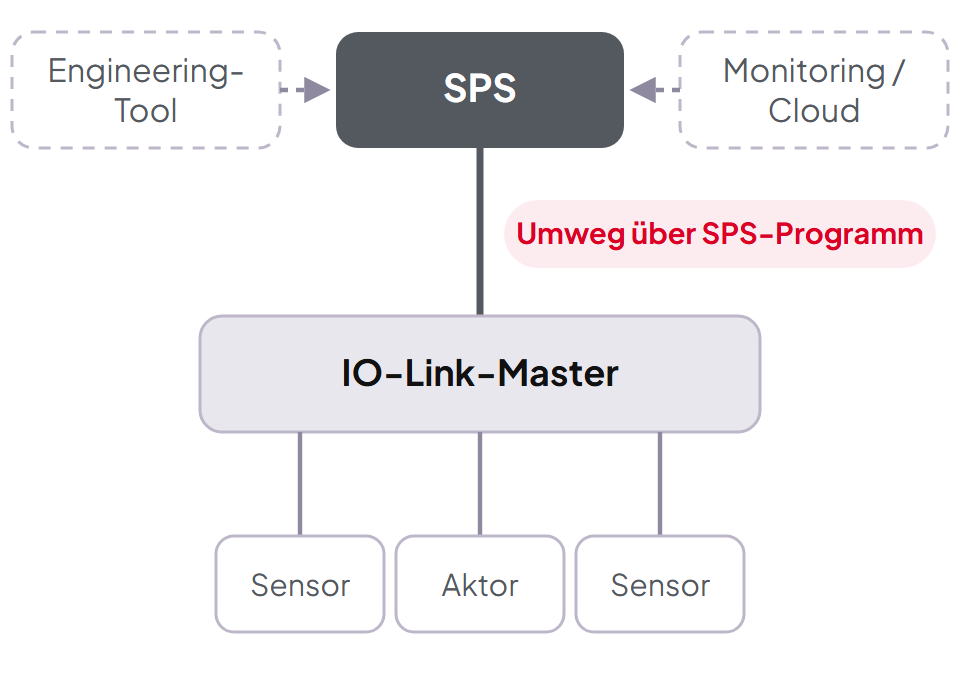
In classic automation, the IO-Link master is connected to exactly one controller. If a configuration tool, monitoring system, web application, or cloud connection also wants to communicate with the master or a device, this is only possible if the controller permits it and provides an interface. If it is missing, this communication does not occur. Therefore, for every new data consumer, someone must modify the PLC program.
Direct access parallel to the PLC would be technically feasible but remains unregulated. Who is allowed to write outputs? Who is allowed to reset a device? And how does the master recognize with whom it is currently communicating?
TODAY All via the PLC
NEW With Gateway Manager
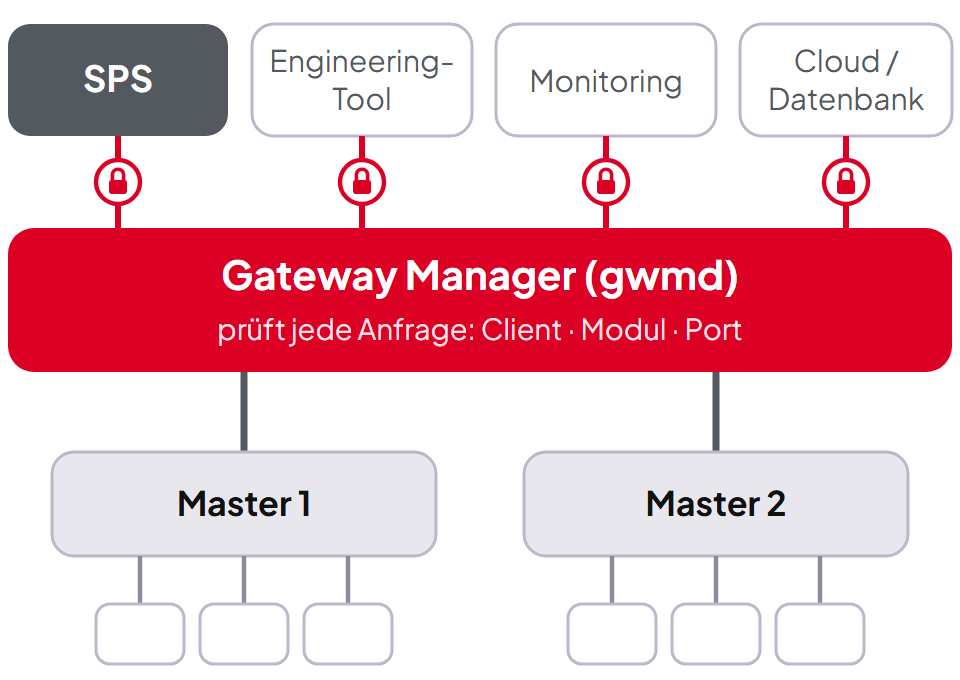
Gateway Management: a second layer with access control
For this purpose, the IO-Link Community has defined a second layer in the ‘IO-Link Gateway Management’ draft (D1.0.0-01, August 2026): a gateway through which multiple clients communicate simultaneously with the same masters, in a regulated and controlled manner. Based on this, TEConcept has built the Gateway Manager Daemon (gwmd), along with the IO-Link Configurator as a web interface.
Draft fully implemented
Every service, every ArgBlock, all state machines. A client that only knows the draft sees a compliant gateway.
Rights down to the port
You define for each client what it is allowed to read or write on which master and port. If necessary, even the content of a telegram can decide.
Securely connected
WSS/TLS with its own CA, fingerprint verification on first contact, and one token per client.
Extended, without touching the draft: Everything TEConcept has added is documented. Every deviation is submitted as a change request to the working group, totaling 27. The four access categories of the draft continue to function as labels on the gwmd’s rights groups.
Video · Part 1 of 2 · 11:44 min
How the Gateway Manager works
In German, with German and English subtitles. The video loads from YouTube only upon clicking (privacy mode).
Five principles by which the gwmd operates
One connection, one identity
Each client identifies itself with its credential: name, ClientID, and client type, plus a token. The ClientID in the telegram is verified, not merely trusted.
Every request is decided before it proceeds
The request block counts as a write, the expected response block as a read. Both must be permitted at this address, and this must be checked at the time of the request, not only upon the master’s response.
Routing by module number
Telegrams go down to the master by module number and back to the correct client by ClientID.
Module 0 is the Gateway itself
Rights, groups, and clients are SMI services like all others. You configure the Gateway Manager with the same tools as a master module.
Clients remain separate
Exclusive acyclic access per port and process data control by priority. The Gateway separates clients where a master cannot.
The rights model: Pattern, Group, Address
The basis is the Standardized Master Interface (SMI). Clients and masters exchange firmly defined data structures there, called ArgBlocks. Each has an identification number, the ArgBlock ID, and a direction. From this, the Gateway Manager builds its rights in three steps:
Step 1
Pattern
recognizes the ArgBlock by its ID, and by its content if necessary
Step 2
Group
combines patterns with identical rights, separated by read and write access
Step 3
Address
binds the group to a client, if necessary only for a specific module and port
A service only passes through if its request block is in a write group and its response block is in a read group, and both groups are bound to the client’s address. The gwmd comes with 18 directed groups ex-works, tailored by purpose. This allows a PLC to set its process data priority without simultaneously being able to assign rights. If the default setting does not suit your application, you can assemble your own groups in the configurator.
Example from the live demo: Reset forbidden
Reset functions for IO-Link are system commands at index 2; common values are 128 to 131. A rule looks into the ArgBlock and recognizes exactly these values. It lands in a separate group ‘Device Reset’, which no client initially receives.
Anyone who Device_write has continues to write parameters. A reset is immediately rejected, with a line in the log. Only when you enable the group will the reset go through.
Video · Part 2 of 2 · 24:37 min
Live Demo in the IO-Link Configurator
In German, with German and English subtitles. The video loads from YouTube only upon clicking (privacy mode).
The Configurator
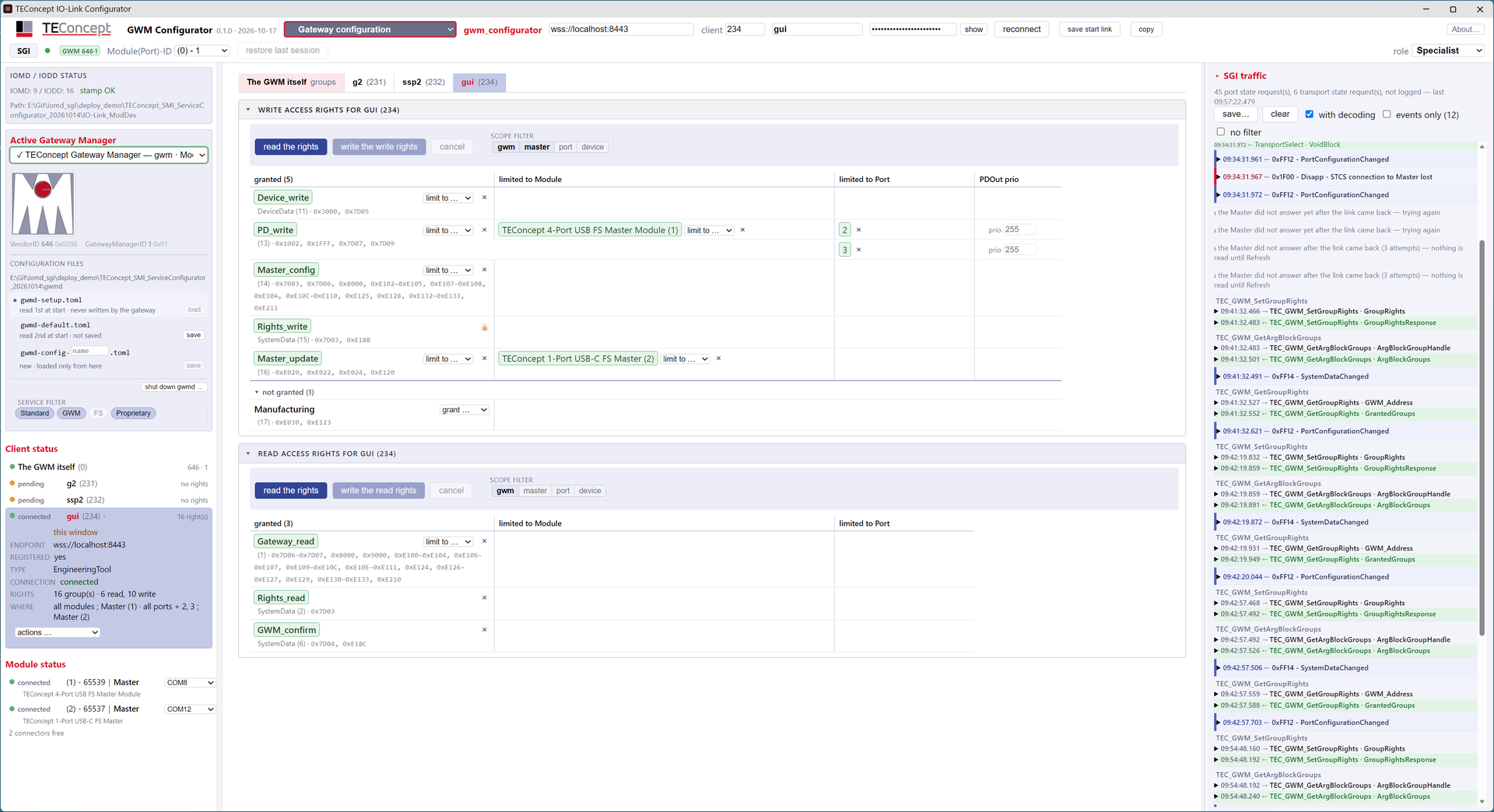
The IO-Link Configurator is a web application that the Gateway Manager delivers directly to the browser. It has four views: Standard Gateway Interface for SMI and SGI services, Gateway Configuration for rights and clients, Master Configuration and Device Configuration with parameters, process data, and firmware download.
On the right side of the window, the SGI traffic runs along, decoded. This way, with every click, you can see which service is sent out and what comes back.
What you see in the video
Scene 3
Event in action
A write access triggers “Device Parameter Written”; other clients are informed

The Gateway Manager is not merely a gatekeeper regulating rights between clients. It is, rather, a technology that opens doors.
Dr. Otto Witte, TEConcept GmbH
Outlook: Doors to the North and South
Thousands of IO-Link sensors are now in the field. It would be a shame to use their data only in automation. The Gateway Manager opens them in two directions.
To the North: Cloud and Data
Because the Gateway Manager limits rights, cloud services, predictive maintenance applications, or databases can access the data from IO-Link sensors. Each receives exactly the rights you grant it.
To the South: New Technologies
Using the SMI module concept, entirely different devices can also be connected to the gateway than just IO-Link masters. For example, a converter to mioty, a radio system with a range of 20 to 30 km, for instance, for fill levels of remote tanks. Or an SPE master that transmits IO-Link via Single Pair Ethernet instead of UART. The existing IO-Link continues to operate.
Under the Hood
Daemon
Written in Rust, asynchronous (tokio), a single binary. Many programming errors are caught in Rust during compilation, not just during operation.
Performance
Measured: less than 10% overhead compared to a system without a Gateway Manager
Towards the Master
Via the STCS interface (SMI Test Communication Server). All manufacturers who have their master tested for conformity implement this. One STCS per master, optionally started and monitored by the gwmd.
Towards Clients
WSS/TLS with its own CA. Fingerprint on first contact, then pinned. One token per credential, never in a URL.
Tools
IO-Link Configurator in the browser, delivered by the gwmd. Additionally, sgi_cli for the command line.
Description-driven
IODD and IOMD describe devices, masters, modules, and the Gateway Manager itself, including extensions. Tools decode from the description, not from code.
Configuration
Initial rights and setups in TOML files, savable directly from the configurator
Frequently Asked Questions
What is IO-Link Gateway Management?
A draft by the IO-Link Community (D1.0.0-01, August 2026). It describes a gateway through which multiple clients can simultaneously access the same IO-Link masters, with access categories, exclusive acyclic access, and process data control.
Is the Gateway Manager compatible with the draft?
Yes. Everything defined in the draft is implemented. A client that only knows the draft sees a compliant gateway. Extensions are documented and submitted as change requests to the working group.
Which IO-Link masters can be connected?
The gwmd communicates with the master via the STCS interface. All manufacturers who have their master tested for conformity implement this.
Which clients can connect?
The IO-Link Configurator in the browser, the command-line tool sgi_cli, and other clients via WSS, such as engineering tools, monitoring systems, or cloud services.
Does the PLC program need to be changed for a new client?
No. Rights are assigned in the Gateway; the controller remains untouched.
How do other clients know that something has changed?
Via events. For example, if a client changes a device’s process data structure via a Device Write, another client would subsequently read the process data incorrectly. Therefore, the Gateway Manager reports exercised rights, such as “Device Parameter Written,” to all clients with rights to that module and port.
How does a new client securely join?
It registers itself and initially receives a credential without rights. The owner compares the fingerprint and then specifically assigns rights. Nothing is released in the background.
See the Gateway Manager in your application?
We will show you the Gateway Manager live and clarify how it fits your masters and clients.